The Social Media Tool Your Agency Will Actually Profit From

Manage every client, hit every deadline, and send polished reports — without hiring more people or paying enterprise prices. Publlish is the only social media platform built around how agencies actually work.
Start Your Free 14-Day Trial
No credit card required · Cancel anytime · Pay as you use
Brand 1
Brand 2
Brand 3
Brand 4
Brand 5
Brand 6
Brand 7
Brand 8
Brand 9
Brand 10
Brand 11
Brand 12
Brand 13
Brand 14
Brand 15
Brand 16
Brand 17
Brand 18
Brand 19
Brand 20
Brand 21
Sound familiar?

Running an agency on duct tape and spreadsheets?

Every SMB agency hits the same wall. More clients means more chaos — juggling approvals, logins, deadlines and reporting across tools that were never built for teams managing multiple brands.
😤
Client approvals via WhatsApp & email
Posts go live before the client even sees them. Feedback gets lost in threads. Everyone's frustrated.
🔀
Switching between 8 different logins
Every client has their own accounts. You're logging in, logging out, praying you posted on the right profile.
📊
Monthly reports take half a day to build
Exporting screenshots, stitching PDFs, formatting numbers — for every single client, every single month.
💸
Tools that charge per seat, per client, per feature
Your tool costs scale faster than your revenue. By the time you have 10 clients, you're paying enterprise prices.

Everything your agency needs. Nothing you don't.

Three jobs. Done right. Without the complexity or cost of tools built for enterprise teams.
01
SCHEDULER

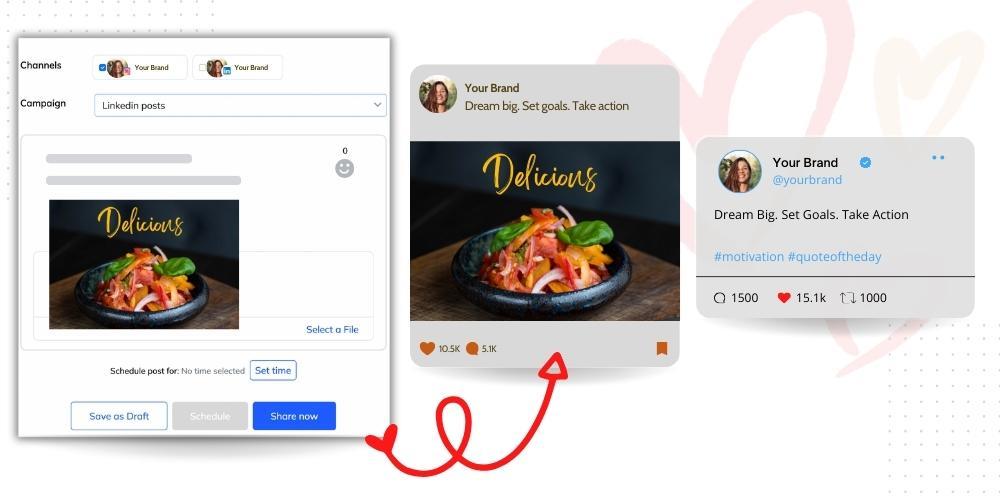
Schedule & Publish across platforms

Onboard a new client in minutes. Connect channels across Instagram, LinkedIn, Facebook, X, TikTok, YouTube & more from a single dashboard. Schedule weeks in advance and let Publlish handle the rest.
02
APPROVALS

Approval, Preview & Feedback

Clients preview, provide feedback and approve the content via content calendar. Maintain complete history of activity (chats and feedback). Posts go live only after approval. No more 'I never saw that post' conversations.
03
REPORTING

Send branded reports in one click

Auto-generate white-label PDF reports for every client. Engagement, reach, follower growth — presented under your agency's branding. Clients see value. You save hours.
Client Management

One dashboard. Unlimited clients.

Each client gets their own workspace — separate content calendars, separate permissions, separate analytics. No cross-contamination. No confusion. Just clean, professional delivery for every brand you manage.
  • Separate workspace per client with isolated content & data
  • Assign team members to specific clients only
  • Client view access without exposing other accounts
  • Onboard a new client in under 1 minute
Client Approvals

Stop project management for client sign-off

Your client previews every scheduled post in a clean review view. They click approve or leave a comment. Nothing goes live without the green light.
  • Post-level comments and change requests
  • Auto-publishing after client approval
  • Full approval audit trail for every client
White-Label Reporting

Reports that make your agency look like a million dollars

Automatically generate branded monthly reports for every client. Your logo. Your colors. Their results. Send a polished PDF in one click — and spend the time you save on work that actually grows your retainers.
  • Auto-generated PDF reports for every client account
  • White-label with your agency's branding
  • Schedule reports to deliver automatically each month
  • Cross-channel data in a single, clean layout
vs The Competition

Why social teams choose Publlish over the alternatives

We compared the tools you're actually considering — across pricing, features, agency capabilities, analytics depth, and the hidden costs nobody talks about until you're already locked in.
Feature
⭐ RecommendedPubllish$3.99/channel · unlimited users · all features included
Buffer$6–$12/channel + per-user + per-feature costs
Metricool$25–$67/brand + per-user + per-feature costs
SocialPilot$30–$200/mo + per-user + per-feature costs
💰 Pricing Model
Pricing structure
How your bill is calculated
✓ Per channel
Pay only for channels you manage. Add unlimited users from your team and clients — all features included in the per-channel cost, at the best price on the market.
Per channel
Costs grow astronomically as more users & channels are added.
Per brand group
Brands = grouped client accounts. More brands = higher tier. Can get complex.
⚠ Per account + per user
Account caps per plan. Extra accounts at $4/mo. Extra users at $5/mo/person.
Cost for 3 channels, 3 users
Real-world agency scenario
✓ $11.97/mo
Same price whether 1 or 10 users. All features included.
$28/mo
$6 per channel + $5/user/month.
$35/mo
$25 base + $5/user/month.
⚠ $40/mo
$30 base + $5/user/month.
Cost scales with team growth
What happens when you hire
✓ No impact
Add your entire team — analysts, copywriters, managers. Zero extra charge.
⚠ Yes — per user
Team plan charges per channel per user. Costs multiply fast.
⚠ Yes — per user
Unlimited users only on the $67/month plan.
⚠ Yes — per user
Unlimited users only on the $200/month plan.
Free trial
Try before you commit
✓ 14 days, no card
2 channels free for life on the free plan, plus unlimited users.
14-day free trial
3 channels on free plan, limited to 10 posts/month.
1 brand free plan
50 posts/month, 1 user, limited analytics.
14-day free trial
No free plan available after the trial ends.
Twitter/X included
No add-on surprises
✓ Included
All 6 channels (Facebook, Instagram, X, LinkedIn, YouTube, and TikTok) included at base price.
Included on all paid plans
⚠ Paid add-on
+$5/month per connected X account, on every plan including Advanced.
Included on all plans
📅 Scheduling & Publishing
1-click cross-channel posting
Write once, publish everywhere
✓ Yes
Yes
Yes
Yes
Platform-native post preview
See exactly how each post will look
✓ Per channel
Preview per platform before scheduling. Catches formatting issues early.
Basic preview
Preview doesn't always match final published post (noted in user reviews).
Visual preview available
Preview per platform
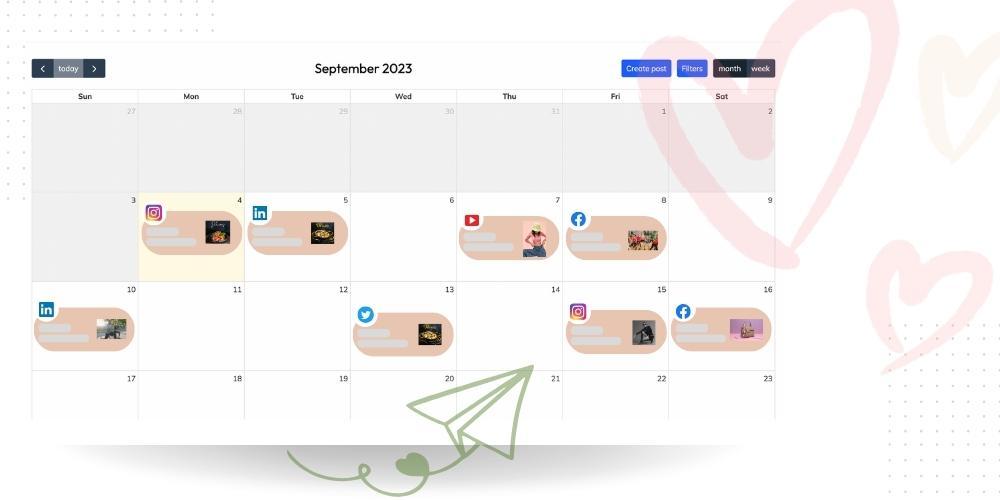
Visual content calendar
See all scheduled posts at a glance
✓ Full calendar view
View all your channel posts in a Weekly/Monthly calendar layout.
Calendar view included
Visual planner included
Calendar view on all plans
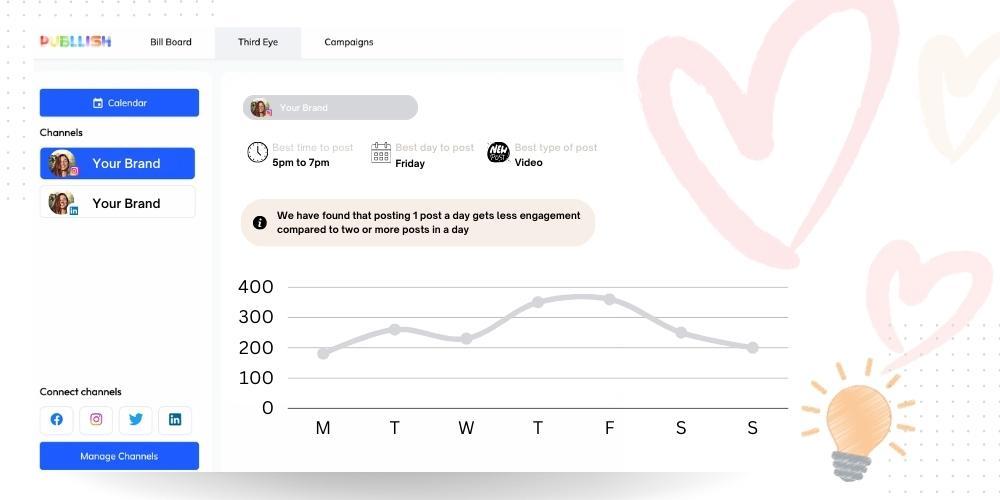
Best-time-to-post (AI / audience data)
Based on your actual audience, not generic advice
✓ From your audience data
Analyses your last 90 days of engagement to surface your optimal posting windows per channel.
Generic suggestions
Suggests times based on general data, not your specific audience behavior.
Best time to post included
Data-driven recommendations on paid plans.
Available on paid plans
Campaign grouping
Manage a launch across channels as one unit
✓ Built-in
Group posts across all channels as a single campaign. See campaign-level analytics.
Partial
Can tag content but no true cross-channel campaign grouping view.
Partial
Bulk scheduling
Upload multiple posts at once
✓ Included
Via content planner
CSV bulk upload on all plans
Stories & Reels scheduling
Instagram & TikTok vertical formats
✓ Fully automated
Stories Planner with visual layout. Auto-publish for Reels and TikTok videos.
Stories & Reels supported
Stories scheduling available
⚠ Partial automation
Reels/Stories sometimes require manual intervention to publish (noted in reviews).
Hashtag Manager
Build, save, and instantly reuse curated hashtag groups
✓ Included
Hashtag tracking
Available as a paid module add-on — not included in standard plans.
Included on paid plans
🏢 Agency & Client Management
Dedicated client workspaces
Separate data & content per client
✓ Unlimited
Each client has an isolated workspace. Content, analytics and permissions fully separated.
✗ Not available
Per-brand structure
Each "brand" is separate but the model is per-brand-group, not per-client-workspace.
Available
From the $100/mo plan.
Content approval workflow
Nothing goes live without sign-off
✓ Built-in, all plans
Submit for review → inline comment → approve. Auto-blocks publishing until approved. Full audit trail.
Team plan only ($12/channel)
Approval workflows locked to the most expensive plan tier.
⚠ Limited collaboration
Team access exists but no formal client approval flow with auto-blocking and audit trail.
Premium plan only ($100/mo)
Full client approval workflow available but gated behind $100/mo plan minimum.
Approval audit trail
Proof of who approved what and when
✓ Full history
Every submission, comment, revision and approval timestamped and stored permanently.
Partial
Approval action logged but less granular comment history.
Team permissions per client
Control who can see what
✓ Granular
Assign team members to specific clients only. They can't see other accounts.
Basic roles
Admin / Analyst / Member roles. Not client-scoped.
Collaborators on Advanced
Can invite per brand on Advanced plan. Not available on Starter.
Role-based access on Standard+
Manager, member, client roles available.
White-label reports
Branded PDFs for client delivery
Coming Soon
Your logo, your colors, auto-generated monthly. Dual branding (agency + client logos).
✗ Not available
Advanced plan only
Custom report templates and branding on Advanced ($53/mo+). Looker Studio on Advanced.
Premium plan ($100/mo)
White-label dashboard + downloadable PDF reports on Premium+.
Scales to 20+ client accounts affordably
What happens at agency scale
✓ Flat pricing
Go from 5 to 50 clients. Price doesn't multiply per client.
⚠ Costs multiply
Each new channel per client adds to your bill. 20 clients × 3 channels = 60 channels.
Add brands incrementally
$3–$5/extra brand. Manageable but gets expensive at 20+ clients.
⚠ Account cap + overages
Premium = 25 accounts. $4/mo each additional. 20 clients × 3 channels = $60+ in overages alone.
📊 Analytics & Reporting
Cross-channel analytics dashboard
All 6 channels in one view
✓ All channels unified
Overview + per-channel deep dive. Facebook, Instagram, X, LinkedIn, YouTube, and TikTok.
Per-channel only
Analytics per channel. No unified cross-channel summary view.
Available
Available
On Premium plans only.
TikTok-specific analytics
FYP %, completion rate, traffic sources
✓ Full TikTok metrics
FYP reach %, completion rate, traffic source breakdown, follower activity heatmap, and more.
TikTok analytics on paid plans
TikTok analytics available
TikTok analytics on Standard+
YouTube analytics
Watch time, retention, CTR
✓ Deep YouTube metrics
Views, watch time, avg view duration, retention curve, impression CTR, end screen CTR.
Basic only
Views and engagement. No watch time, retention curve or impression CTR.
YouTube analytics included
YouTube analytics on Standard+
Competitor analysis
Track competitors' performance
Coming Soon
Track benchmark metrics vs. defined competitors.
✗ Not available
5 profiles free · 100 on paid
✗ Not available
Scheduled auto-reports (PDF)
Delivered to inbox automatically
✓ Fully automated
Set once. Report generates and emails every month. No manual work.
✗ Manual export only
Starter plan + (PDF/PPT)
Downloadable on paid plans. Custom templates on Advanced. Not auto-scheduled.
Available on Premium+
Custom report builder
Choose exactly which metrics to include
✓ Full builder
Select metrics per channel, set goals, add annotations, add AI insights, set delivery. All channels, all metrics.
✗ No custom reports
Smart Reports on Advanced
Custom templates on Advanced plan. Looker Studio integration for full customization.
Basic customization
Can customize report format but less granular metric selection vs. Publlish.
Analytics historical data
How far back you can look
✓ Full history
All historical data from the day you connected your channels.
Limited on lower plans
Analytics depth varies by plan. Basic metrics on Essentials.
⚠ 3 months free · full on paid
Free plan: 3 months. Starter+: full history. Important caveat for historical analysis.
Full history on paid plans
💬 Engagement & Automation
Automated DM replies
Auto-respond to new follows, DMs, story replies
✓ Built-in automation
Trigger-based auto-replies on Instagram & Facebook. Personalisation tokens included.
✗ Not available
✗ Not available
✗ Not available
Automated comment replies
Respond to comments by trigger keyword
✓ Built-in
Trigger-based auto-replies on Instagram & Facebook comments. Full activity log.
✗ Not available
✗ Not available
✗ Not available
Social / unified inbox
Manage all messages from one place
✓ Included
Engagement tab on paid plans
Comment management available but not a full unified inbox.
Unified inbox on all plans
Standard plan ($50) +
Social inbox not available on the entry-level $30 Essentials plan.
👥 Team & Collaboration
Unlimited team members
Invite your whole team at no extra charge
✓ Always
No seat limits. No per-user fees. Invite everyone who needs access.
⚠ Per-channel per-user billing
Team plan: cost = channels × users. Three users triples your channel cost.
Unlimited users on all paid plans
Major advantage — add collaborators freely on any Metricool paid plan.
⚠ Extra $5/user/month
Standard/Premium: each additional user beyond the plan limit = $5/mo more.
Role-based permissions
Control who can publish, approve, view
✓ Granular, per client
Set roles per workspace. Team member sees only their assigned clients.
Basic roles — Team plan only
Admin / Analyst / Member. Account-level only, not client-scoped.
Collaborators on Advanced
Per-brand collaborator access. Not available on Starter plan.
Role-based access on $100/mo plan
Manager, member, client, and user roles.
Post-level comments for review
Discuss before approving
✓ Inline on every post
Comment directly on draft posts. Thread history kept with approval record.
On Premium plans
Ready to make the switch?Start Free — 14 Days →
No credit card · No per-seat fees

See exactly what you'd pay — at your scale

Adjust the sliders to match your real setup. See how costs compare across tools.

Social Channels
6
Team Members
3
Client Accounts
5
PUBLLISH
$23.94
/month est.
Per channel only
BUFFER
$66
/month est.
Per channel × users
+$42.06/mo vs Publlish
METRICOOL
$60
/month est.
Per brand + X add-on
+$36.06/mo vs Publlish
SOCIALPILOT
$65
/month est.
Per account + per user
+$41.06/mo vs Publlish

The costs they don't advertise

Pricing pages show you the starting price. Here's what your bill actually looks like once you're inside.

Buffer
Looks like $6/mo. Feels like more.
  • $6/channel/mo sounds cheap, but costs grow exponentially with each added user and client.
  • Approval workflow only on Team plan ($12/ch/mo) — not on cheaper Essentials.
  • No white-label reports, no client workspaces — not really an agency tool.
  • Analytics are basic on Essentials — upgrade required for reporting depth.
Metricool
Good analytics. A few gotchas.
  • Twitter/X costs +$5/month per connected account — on every plan, including Advanced.
  • Hashtag tracking is a paid add-on module — not included in any standard plan.
  • No client approval workflow. Agencies must manage approvals outside the tool.
  • Custom report templates locked to Advanced ($67/mo). Looker Studio same tier.
SocialPilot
Agency features exist — at a price.
  • Extra social accounts cost $4/mo each above your plan cap. 20 extra = $80/mo extra.
  • Each extra user = +$5/mo on Standard and Premium plans.
  • White-label reports, client approval and client portal gated behind $100/mo plan.
  • Social Inbox not available on entry-level Essentials ($30/mo) plan.
Publlish
What you see is what you pay.
  • Per-channel pricing — only variable is the number of channels, not team size or clients.
  • All 6 channels (Facebook, Instagram, X, LinkedIn, YouTube, and TikTok) included. No add-ons for any platform.
  • Unlimited team members on all plans. Add your entire agency team at zero extra cost.
  • Content approval, automated reports, DM automation — included, not gated behind enterprise tiers.
Agency Stories

Teams that switched from the big names

Real results from real agencies managing real clients.
★★★★★

We were paying $200/month only for scheduler and approval and still manually building reports per client as per the need. Switched to Publlish and cut our tool spend by 60% — and our reporting time went from 4 hours to 15 minutes per client.

Saved 12+ hrs/month on reporting
Marcus K.
Founder, Social Media Agency — 14 clients
★★★★★

The client approval flow alone is worth it. Before Publlish, posts would go live before clients even reviewed them. Now we have a trail on everything and zero 'I didn't approve that' calls.

Zero approval disputes since switching
Sana R.
Head of Social — 9 clients
★★★★★

Our old tool was beautiful but we couldn't afford it as we grew. Publlish gave us everything we needed — the workspace structure, the approvals, the reports — at a price that actually made sense for an agency our size.

Grew from 6 to 15 clients on same plan
James T.
CEO, Social Media Agency — 22 clients

Your clients deserve better. So does your team.

  • 14 days free trial
  • No credit card required
  • Setup in 5 minutes
  • Cancel anytime

Frequently Asked Questions

Yes. The Agency Pro plan gives you unlimited client workspaces at a flat monthly rate. Whether you have 5 clients or 50, you pay the same. We built it this way because we know how agency growth actually works — your tool costs shouldn't eat into your margins.
Yes, clients are required to create an account with Publlish. It has multiple advantages:
  1. Never share passwords with the agency — they can connect their own channels and give access to any agency. Remove users as and when required.
  2. Approval audit trail - Logged-in clients can provide feedback which is recorded for every post, creating an audit trail for the future.
  3. Multiple team approval - More than one person from the client side can provide approval and all of them will be part of the audit trail.
Absolutely. Each client is an isolated workspace with its own permissions. You can assign team members to specific clients only — they'll never see content, reports, or data from accounts they're not assigned to.
Upload your agency logo and set your brand colors once in settings. Every report generated — whether manually triggered or on a monthly auto-schedule — will use your branding. Clients receive a professional PDF that looks like something your team built, not an export from a third-party tool.
You'll be prompted to choose a plan. We won't charge you automatically without your confirmation — and we don't ask for a credit card to start the trial in the first place. If you decide Publlish isn't right for you, you can export your data and leave. No hard feelings, no hoops.